AI and MCP
An AI that asks before it changes anything.
There are two ways, and both are off by default. In the editor, an AI service of your choice helps you with your wording. From outside, assistants and agents can read your notes over MCP and propose drafts. Only what you take over yourself ends up in your notes.
Help with writing, right inside the note
Every account brings its own service, meaning an address, a key and a model. That way everyone pays for what they use themselves, a bit like having your own mailbox.
Five jobs the AI can do for you
Once a service is set up, you'll find AI in the editor's toolbar and in the right-click menu. You select a paragraph or take the whole note.
- Correct spelling: The AI fixes mistakes without touching what you actually said.
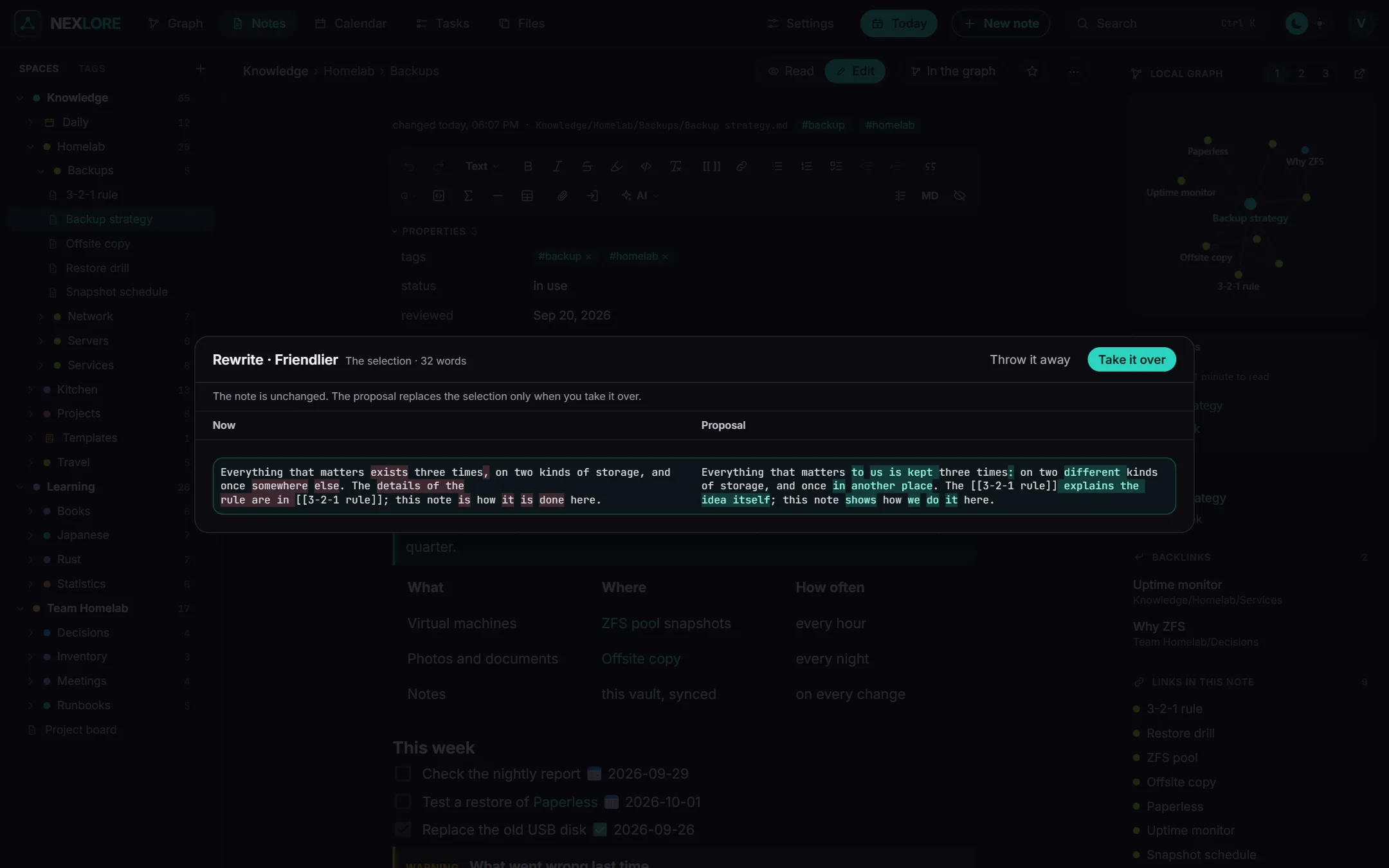
- Rewrite: You pick one of nine tones, namely More formal, Official letter, Plain language, Matter-of-fact, Friendlier, Firmer, Calmer, Shorter or More detailed.
- Translate and Summarize: The AI puts the text into another language or sums it up briefly.
- Write for me: You say what you need, and the AI writes it with your note as material.
Wiki links, embeds, tags, tasks, callouts, code and formulas stay exactly as they were written.
Lore saysThe result always appears next to your text first. Your note only changes when you click “Take it over”, and undo brings the old text back.
Any service that speaks the usual chat interface
nexlore isn't tied to any provider. All it needs is the usual /chat/completions interface that nearly every service offers, in the cloud and at home. For well-known services there are tiles that fill in the address. A model on your own machine with Ollama works just as well, and then not a single word leaves your house.
Address http://ollama.example.com:11434/v1/
Key     (empty for Ollama)
Model   llama3.1
You can see exactly what left your house
With AI in the editor, note text goes out. That's why there are two latches and a list that shows everything.
Two latches
First the operator has to allow AI for the server, which is off by default. After that, each person switches it on for themselves, and that only works once their access details are complete.
Only what you select
Only the text you selected goes to the service. Other notes, let alone your whole vault, stay with you.
14 days, word for word
Under “What went out” you'll find every request word for word. nexlore stores them encrypted for 14 days, and you can empty the list at any time.
Assistants from outside with MCP
nexlore speaks the Model Context Protocol. An AI program on your computer or an agent can use it to search and read your notes, and depending on the key, also propose changes or write on its own.
Keys of its own for every account and every space
The operator switches MCP on under Settings and decides the highest level a key may have. If they lower that limit later, it applies to existing keys as well.
After that, every account creates its own keys on its account page. You give a key a name and a level and decide which spaces it may see, either all the ones you can read, including future ones, or only a chosen few. nexlore shows you the key exactly once and keeps only its hash.
- Never more than your account: A key sees at most what its account may read.
- Ready-made lines to paste: Right next to the key you'll find what to copy into your program.
- Up to 20 keys: That's how many each account can create.
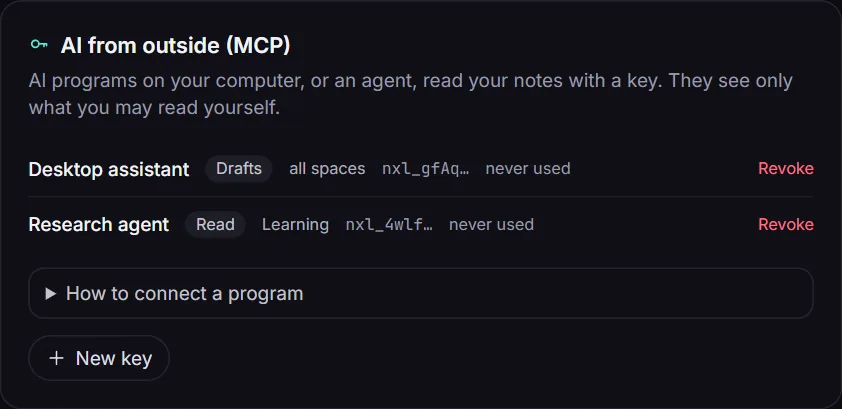
Three levels, so you decide how far an AI may go
Tools above a key's level simply don't exist for that key. It doesn't even see them in the list.
| Level | Tools | What for |
|---|---|---|
| Read | list_spaces, search, find_notes, read_note, list_folder, note_links, list_tasks | questions about your notes, summaries and research |
| Drafts | plus propose_change and propose_note | proposals that wait on the note until you take them over |
| Write | plus write_note, edit_note and create_note | agents you trust, for example to take minutes |
Drafts wait until you look at them
A draft shows up as a bar on the note. You compare it with your text and take it over or throw it away. The account menu lists every draft that's still open. If the note has changed in the meantime, the draft lands next to it as a conflict copy.
When an AI writes, nothing gets lost
To write, the AI needs the hash it got from read_note. Lines it didn't change stay exactly as they were, byte for byte. If the note has changed since then or someone is typing in it right now, the new text goes into a conflict copy. Every change becomes a version with the source “AI (MCP)”.
How to connect a program
The address is https://your-nexlore/api/mcp. For the transport nexlore uses “Streamable HTTP” without a stream, so every request gets its answer as JSON. You send the key in the Authorization header.
{
  "mcpServers": {
    "nexlore": {
      "type": "http",
      "url": "https://notes.example.com/api/mcp",
      "headers": { "Authorization": "Bearer nxl_..." }
    }
  }
}curl -s https://notes.example.com/api/mcp \
-H "Authorization: Bearer nxl_..." \
-H "Content-Type: application/json" \
-d '{"jsonrpc":"2.0","id":1,"method":"tools/list"}'Lore saysIn search hits nexlore marks the words it found «like this». That way the program sees where it found something, and bold text doesn't get mixed up.
When nexlore turns a request down
MCP sits behind several walls. The table lists them from the outside in.
| When | Answer |
|---|---|
the request carries an Origin header, as every web page sends one | 403, so that no web page can use a key it got hold of somewhere |
| MCP is switched off | 404, even with a valid key |
| the key is missing, wrong or revoked, the account is locked or first has to set up its second factor | 401 |
| more than 240 requests a minute come in with one key | 429 with Retry-After |
| someone asks for a space the key may not see | “Not found.”, exactly as for a space that doesn't exist |
| someone sends the browser's session cookie along | The cookie doesn't count, only the key does. |