Plugins
More possibilities, without more rights.
A plugin sits next to a note, draws a code block of its own or shows a note in a completely different way. It runs locked up in the browser the whole time and gets only what it asks for in its manifest.
Four checked plugins that come right along
nexlore ships with four plugins. Every one of their files has a checksum on record, and a file that doesn't match it won't be installed.
Contents
Next to the note you see its headings, how many words it has and how long it takes to read. For that, the plugin may read the note.
Queries
A query block lists notes by tag or folder, as a list or as a table. The plugin only reads and never runs Dataview code. For that, it may list notes.
Kanban
Notes with kanban-plugin in their front matter appear as a board. When you move a card, the plugin rewrites only the lanes that changed, and the file stays ordinary Markdown. For that, it may read and write the note.
Rediscover
The plugin shows you a random older note and what you wrote a year ago today. For that, it may list notes.
A Kanban board that stays an ordinary note
Every lane is a heading, and every card is a task below it. That way the board stays an ordinary Markdown file that you can open in any other editor too.
---
kanban-plugin: basic
---

## Ideas

- [ ] Second UPS for the switch


## Doing

- [ ] Renew certificates


## Done

- [x] Write the restore runbook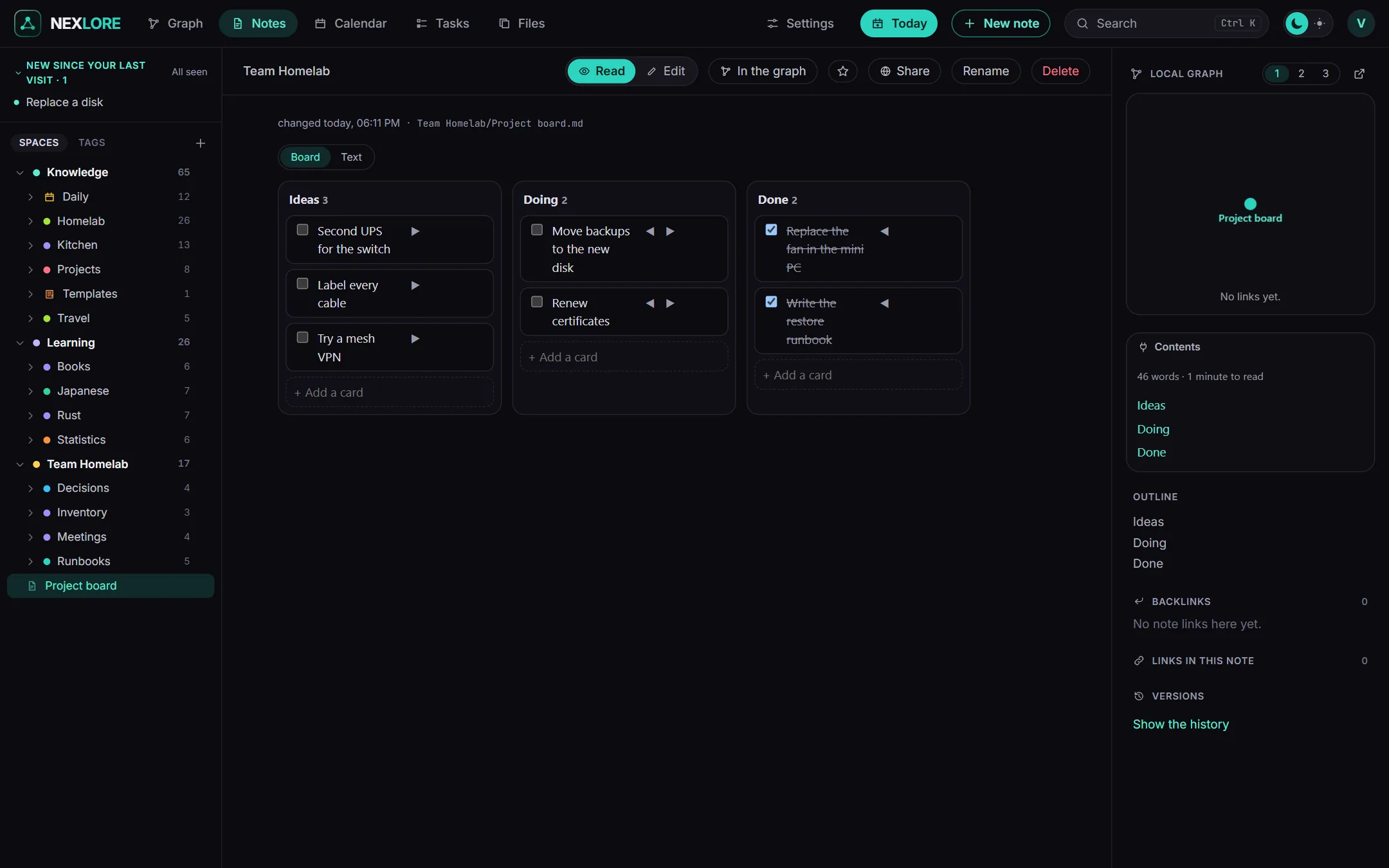
Everyone decides for themselves which plugins they use
A plugin being installed doesn't mean it's running. It takes three steps before it shows up for you.
- The operator installs
Under Settings, Server, AI and plugins, they pick a plugin from the catalog. After that it's there, but still off for everyone.
- The operator lets it out
Only once they let the plugin out does it appear for the accounts.
- You switch it on
Under My account, Plugins for me you switch it on just for yourself. Each plugin also says there what it may do.
Lore saysWhile a plugin is off, you simply see its code block as text. So nothing runs that you didn't switch on yourself.
A plugin can't get at your data unless you allow it
Every plugin runs in a sealed-off frame without an origin of its own. The only way out leads through the page it sits on, and it has to ask that page.
No network
A plugin can't load anything, can't navigate anywhere and can't send a request to a server.
No sign-in
It gets no cookie and no access to the app's storage. It doesn't know your session, so it can't use it either.
Only what the manifest says
The page answers only the questions the manifest lists under permissions. If a plugin wants to write, the server checks that right once more.
Plugin files of your own sit behind a latch
Browsers don't let a page close every way out of such a frame. Through WebRTC, code inside could send off whatever it gets to see. That's why plugin files that don't come from the catalog need a latch the operator has to open first. When they open it, and with every upload, nexlore asks again with a clear warning.
Unchecked plugins are marked
A plugin from a file of your own carries the note “own file, not checked” in the list. It runs just as locked up, but nobody except you has read its code. So only allow what you have read yourself or what comes from someone you trust.
Your own plugin in two files
manifest.json says what the plugin is and what it may do, and main.js does the actual work. The example here counts the words next to the note.
{
  "id": "word-count",
  "version": "1.0.0",
  "author": "you",
  "name": { "en": "Word count", "de": "Wörter" },
  "description": { "en": "Counts the words of the note." },
  "permissions": ["note:read"],
  "place": { "panel": true },
  "strings": {
    "en": { "words_one": "{{count}} word",
            "words_other": "{{count}} words" }
  }
}nexlore.ready(function (context) {
nexlore.ask('note.read').then(function (note) {
var words = note.content.split(/\s+/).filter(Boolean).length
document.getElementById('app').textContent =
nexlore.t('words', { count: words })
})
})
nexlore.on('changed', function () {
// the note changed: read it again
})| Field | What goes in |
|---|---|
id | lower case letters, digits and -, 2 to 32 characters long and not an id that the catalog already uses |
version | a version like 1.0.0 |
permissions | any number of note:read, note:write and vault:read |
place | exactly one of these, { "panel": true } next to the note, { "block": "language" } for a code block of its own, or { "view": { "frontmatter": "key" } } as a view for notes with that property |
name, description | a text, or texts per language with at least en |
strings | the plugin's own texts per language, for nexlore.t |
Lore saysA code block of your own may not be called dataview, dataviewjs, tasks, mermaid, math, latex or query-results, because those names are already taken.
What a plugin can find out from nexlore
main.js runs after a small library called nexlore. context holds the place, path, language, texts and theme, and for a code block also its text.
| Request | Needs | Answer |
|---|---|---|
nexlore.ask('note.read') | note:read | { path, title, content, hash } |
nexlore.ask('note.write', { content, base_hash }) | note:write | { saved, conflict, hash }; if the note changed in the meantime, a conflict copy is made |
nexlore.ask('vault.query', { tag, folder, space, sort, limit, random, day }) | vault:read | up to 200 notes the account may read |
nexlore.ask('note.open', { path }) | nothing | opens a note the account may read |
nexlore.ask('note.reveal', { heading, index }) | nothing | scrolls the note to a heading |
nexlore.t(key, { count }) picks _one or _other depending on the count, and nexlore.resize() fits the frame to its content, although that also happens on its own. main.js may be at most 512 KB and the manifest at most 64 KB.