The app step by step · Chapter 24
Daily notes and templates
A daily note is where you write down everything that comes up today. A template is a note you make new notes from, so you don't have to start from scratch every time.
A note of its own for every day
With Today in the header or Alt + T you open today's note, for example 2026-10-02.md in the folder Daily. If it doesn't exist yet, nexlore creates it, from a template if you like.
Which folder and which template are used is set by whoever manages the space, under Settings, Spaces in the space's Options. A daily note is always called YYYY-MM-DD.md.
New notes from a template
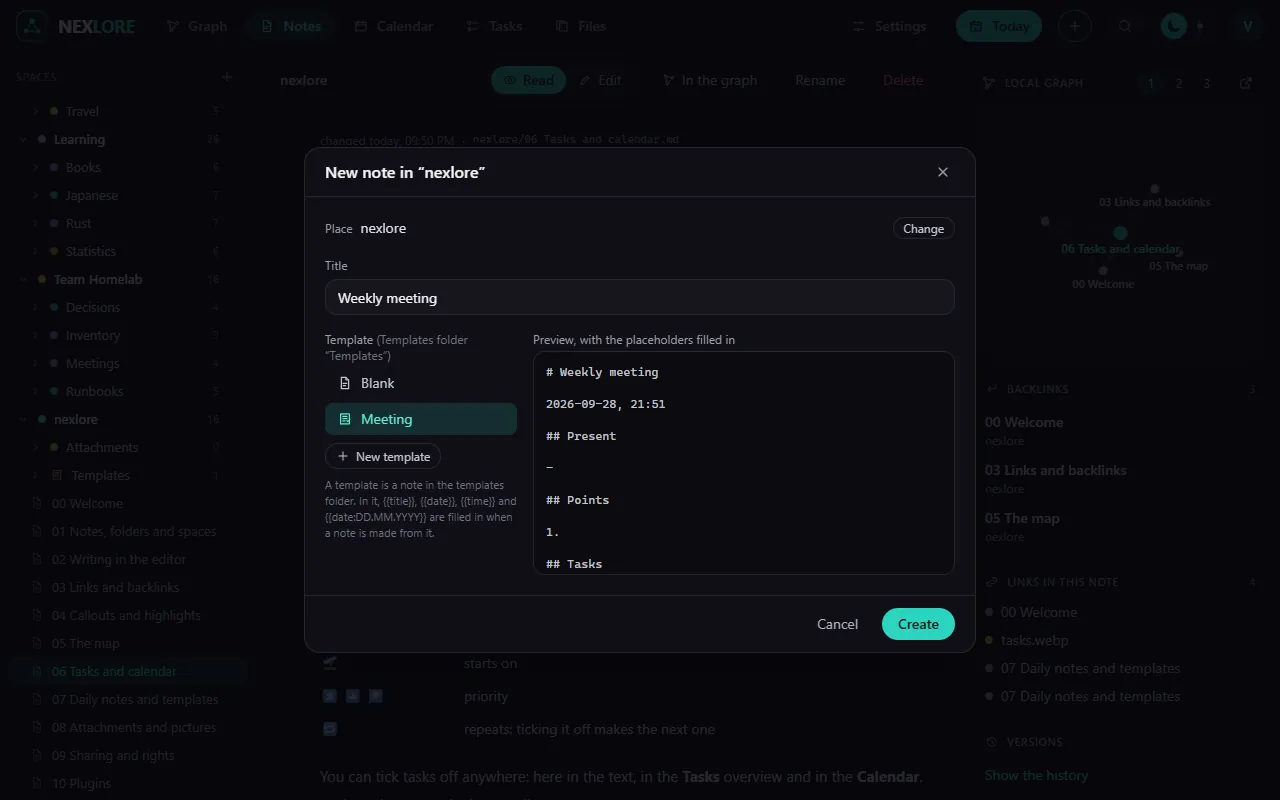
A template is an ordinary note in the space's Templates folder. You can pick it in the New note dialog and right away see a preview with the placeholders already filled in.
# {{title}}

{{date:DD.MM.YYYY}}, {{time}}

## Present

## Tasks
- [ ]Garden meeting
02.10.2026, 18:30
Present
Tasks
| Placeholder | becomes |
|---|---|
{{title}} | the new note's title |
{{date}} | today's date, 2026-10-02 |
{{time}} | the time, 18:30 |
{{date:DD.MM.YYYY}} | the date in the given format |
{{date:dddd, D MMMM}} | “Friday, 2 October”, in your account's language |
You create a new template in the New note dialog with New template. You can also right-click a note and choose Save as template.
Lore saysnexlore never runs Templater commands like <% tp.date.now() %>. They simply stay as text in the new note.